
A deeper look at why this AI assistant feels different
If you follow AI closely, you'll notice a pattern.
Most tools arrive loudly. Big launches. Bold claims. Short-lived excitement.
Clawdbot didn't arrive that way.
Instead, it started showing up quietly in technical forums, private Slack groups, and long GitHub threads. People weren't asking how to prompt it better. They were asking how to move more of their real work into it.
That difference matters.
So rather than listing features, let's slow down and examine the real question behind the hype: Why does Clawdbot feel less like a chatbot and more like a system?
How We've Trained Ourselves to Use AI
Before understanding Clawdbot, it helps to notice something we rarely question.
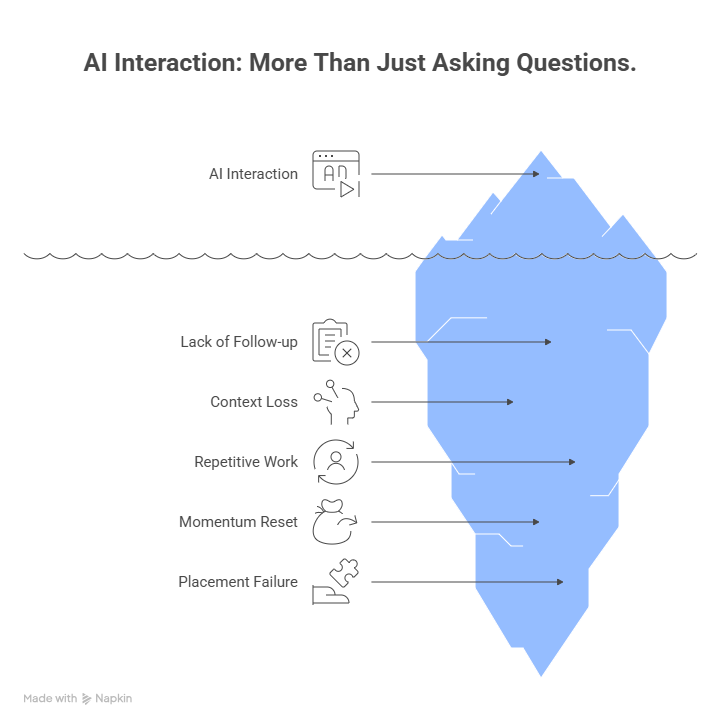
Most of us treat AI as a place we visit.
We open a browser tab.
We ask a question.
We get an answer.
We leave.
Even when the response is good, the work isn't done. We still need to decide, execute, follow up, and remember where things left off. When we return days or weeks later, the AI doesn't remember the path that led there.
So we repeat ourselves.
Context gets rewritten.
Decisions get re-explained.
Momentum resets.
This isn't a failure of intelligence. It's a failure of placement.
Why Placement Matters More Than Intelligence
Clawdbot changes something deceptively simple: where the AI runs.
Instead of living in the cloud behind a web interface, Clawdbot runs on your own hardware. That could be:
- Your laptop
- A Raspberry Pi running 24/7
- A small server or VPS
Because it's self-hosted, it doesn't disappear when you close a tab. It stays active. Conversations are stored locally as Markdown files. Context accumulates over time instead of resetting.
This single architectural choice unlocks behavior most AI tools simply cannot offer.
What Persistent Memory Actually Enables
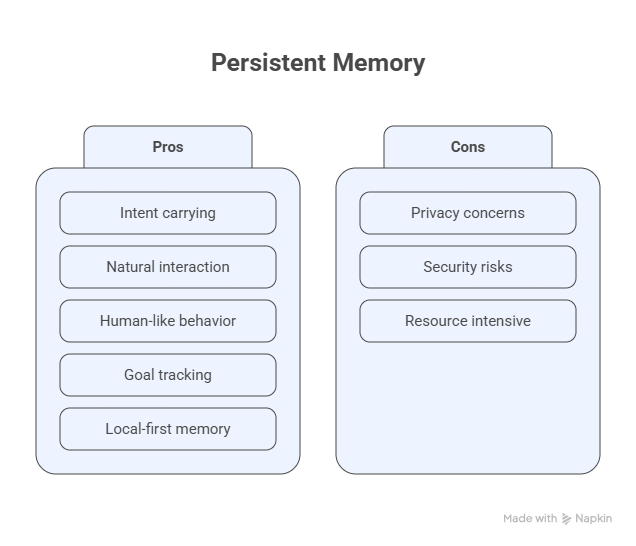
Persistent memory isn't about saving chat logs.
It's about carrying intent forward.
Imagine mentioning a project deadline casually in a conversation. No special command. No reminder setup. Just natural language.
Weeks later, Clawdbot brings it up again.
Not because you asked.
Because it remembered that it mattered.
This is how humans work. We don't operate in isolated sessions. We track goals, constraints, and priorities across time.
Clawdbot's local-first memory allows it to behave more like a participant in ongoing work, not a disposable helper.
The Shift from Prompting to Timing
Once memory persists, something else changes: interaction timing.
Most AI tools wait.
You initiate.
They respond.
Clawdbot doesn't have to.
Users configure it to send morning briefings, alerts, or updates automatically. Weather, calendar context, reminders, task summaries, even personalized news can arrive before the day starts. This feels subtle at first, but the psychological shift is significant. You stop "asking for help" and start receiving support. That's the difference between conversation and delegation.
When Messaging Becomes a Control Surface
Here's where Clawdbot moves into territory that surprises even experienced AI users. It doesn't just talk. It can act on the system itself.
Through approved tools and skills, Clawdbot can:
- Execute shell commands
- Read and write files
- Fill web forms
- Control browsers
- Run scripts
- Open pull requests
- Trigger deployments
And it does this through messaging apps people already live in: WhatsApp, Telegram, Discord, Slack, Signal, iMessage.
At that point, chat is no longer just communication. It becomes an interface to execution.
This is why some users describe Clawdbot as an "AI operator" rather than an assistant.
Real-World Usage That Explains the Hype
The excitement around Clawdbot isn't theoretical. It's practical.
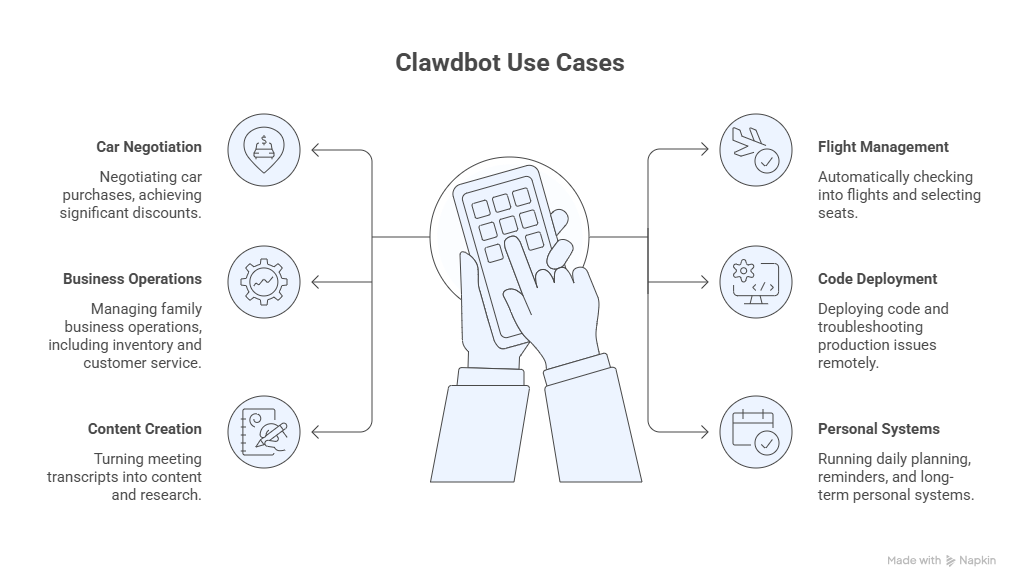
People are already using it to:
- Negotiate car purchases (one user achieved a $4,200 dealer discount)
- Automatically check into flights and select seats
- Manage family business operations including inventory, scheduling, and customer service
- Deploy code and troubleshoot production issues remotely
- Turn meeting transcripts into content and research
- Run daily planning, reminders, and long-term personal systems
All without switching tools or opening dashboards.
The common thread across these examples isn't automation for automation's sake. It's removing the friction between deciding and doing.
Why This Matters Across Industries
This architectural shift has ripple effects.
For developers, it means fewer context switches and the ability to manage systems asynchronously.
For founders and operators, it creates an always-on operational layer that doesn't require constant supervision.
For marketing and research teams, it turns conversations into structured outputs and follow-through rather than scattered notes.
For individuals, it reduces cognitive load by offloading routine decisions and reminders.
Different roles, same benefit: continuity.
The Trade-Offs Are Real
Clawdbot is powerful, but it is not a “set it and forget it” tool.
Using it well requires:
- Comfort with technical setup
- Careful security configuration
- Reviewing Skills and plugins before use
- Ongoing ownership and maintenance
That’s also why it appeals to a specific audience. People who value privacy, control, and depth are often willing to trade convenience for autonomy.
Security: What You Need to Know
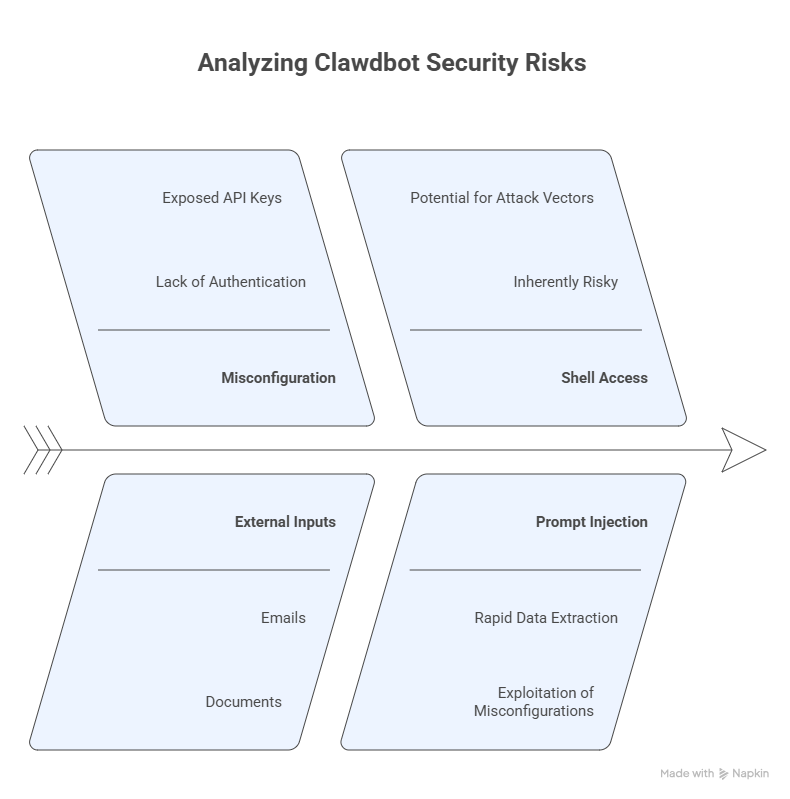
Clawdbot’s system access creates real risk if deployed carelessly.
In early 2026, security researchers reported hundreds of publicly exposed Clawdbot instances with no authentication. In several cases, API keys, secrets, and private chat data were extracted from misconfigured setups within minutes using prompt injection.
This was not a flaw in Clawdbot itself.
It was a misconfiguration.
Clawdbot processes external inputs like emails, documents, and web pages. Any content it reads can become an attack vector. Even the official documentation states clearly: running an AI agent with shell access is inherently risky.
Minimum Deployment Practices (Not Optional)
If you run Clawdbot, you should:
- Use dedicated or isolated hardware
- Grant only minimum required permissions
- Review every Skill and plugin
- Secure any remote gateway access
- Keep independent backups
- Use temporary credentials for testing
These are baseline precautions, not advanced hardening.
Who Should Think Twice
Clawdbot may not be a good fit if you:
- Lack command-line experience
- Cannot isolate it from sensitive data
- Need a zero-maintenance solution
- Are unwilling to learn basic security practices
The capability is real. So is the responsibility.
Why People Still Pay Attention
Clawdbot keeps coming up because it aligns AI with how work actually happens.
It stays present.
It remembers across time.
It sits close to execution.
Once you experience that continuity, session-based AI starts to feel limiting.
The Bigger Signal
Clawdbot isn’t the final form of personal AI.
But it clearly points to where things are heading:
AI shifting from something we occasionally consult to something that stays with our work.
That shift is powerful.
And it deserves to be approached with eyes open.
A Direction Worth Watching Closely
Clawdbot isn't the final form of personal AI. But it clearly points to something important:
AI moving from something we consult to something that stays with our work.
That transition has deep implications for productivity, privacy, and how teams operate.
If you're exploring where practical AI is heading, Clawdbot isn't just a tool to try. It's a model worth understanding, with both its transformative potential and its genuine responsibilities clearly in view.
If you want a complete Clawdbot tutorial series, deep breakdowns, and real-world implementations, follow Linkenite's youtube page and stay tuned.


.png)
.png)
.png)
.png)
.png)
.png)
.png)
.png)
.png)
.png)
.png)
.png)

.png)
.png)
.png)
.png)


.png)
.png)

.png)


.jpg)

.jpg)
.jpg)


.png)


.png)

.png)
.png)
.png)


.png)
%20(2).png)
.png)
.png)




.png)

.png)


.png)


.png)


.png)


%20BLOG%20BANNER.png)


.png)