.png)
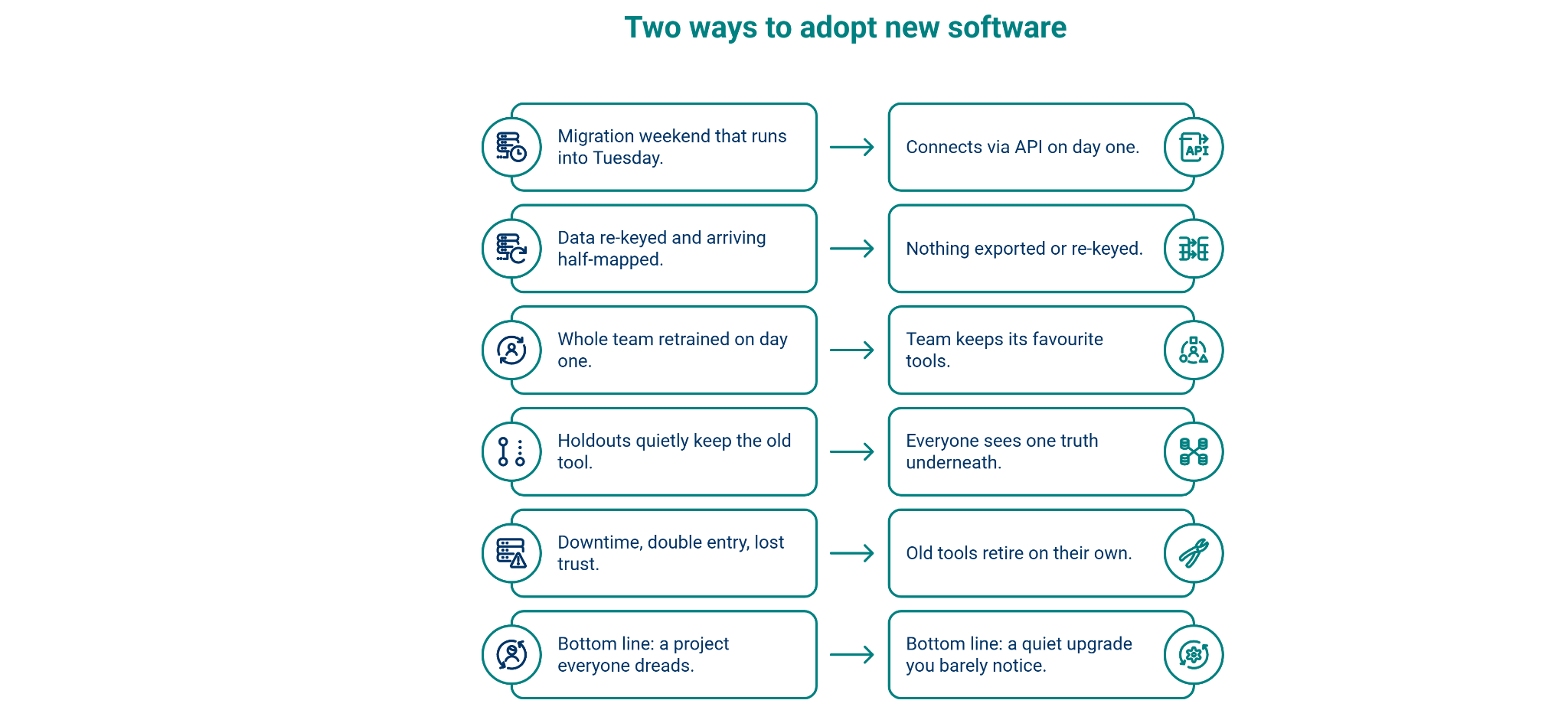
Every owner who has switched a core system knows the dread. The migration weekend that runs into Tuesday. The data that arrives half-mapped. The team that nods through training and quietly keeps using the old tool anyway. New software is supposed to help, but the switch itself is where most of the pain, and most of the failures, live.
Linkenite is built so that switch never happens. As an organizational agentic layer, it sits underneath the tools you already run rather than replacing them. There is no migration, no big-bang cutover, and no day where your team has to learn everything at once.
Where Linkenite’s agentic intelligence layer sits
Not in front of your tools, not in place of them, underneath them.
Most software asks for a spot in your stack. Linkenite asks for the foundation beneath it. As an organizational agentic layer, it sits below the CRM, ERP, project tools, and inboxes you already run, holding one shared store of records that every system reads from and writes back to. Your tools become views onto that layer; the layer keeps them in agreement.
If you adopt it, that position is what will help your company in three ways:
- One source of truth, so no one wastes time deciding which system is right.
- Agents that act on that truth, doing the repetitive work your team does today.
- A rollout that costs you no disruption, because nothing is being replaced.
The rest of this piece is about that last point, the part owners worry about most.
Here is how the rollout actually unfolds.
It connects, it doesn't replace
The fastest migration is the one you never run.
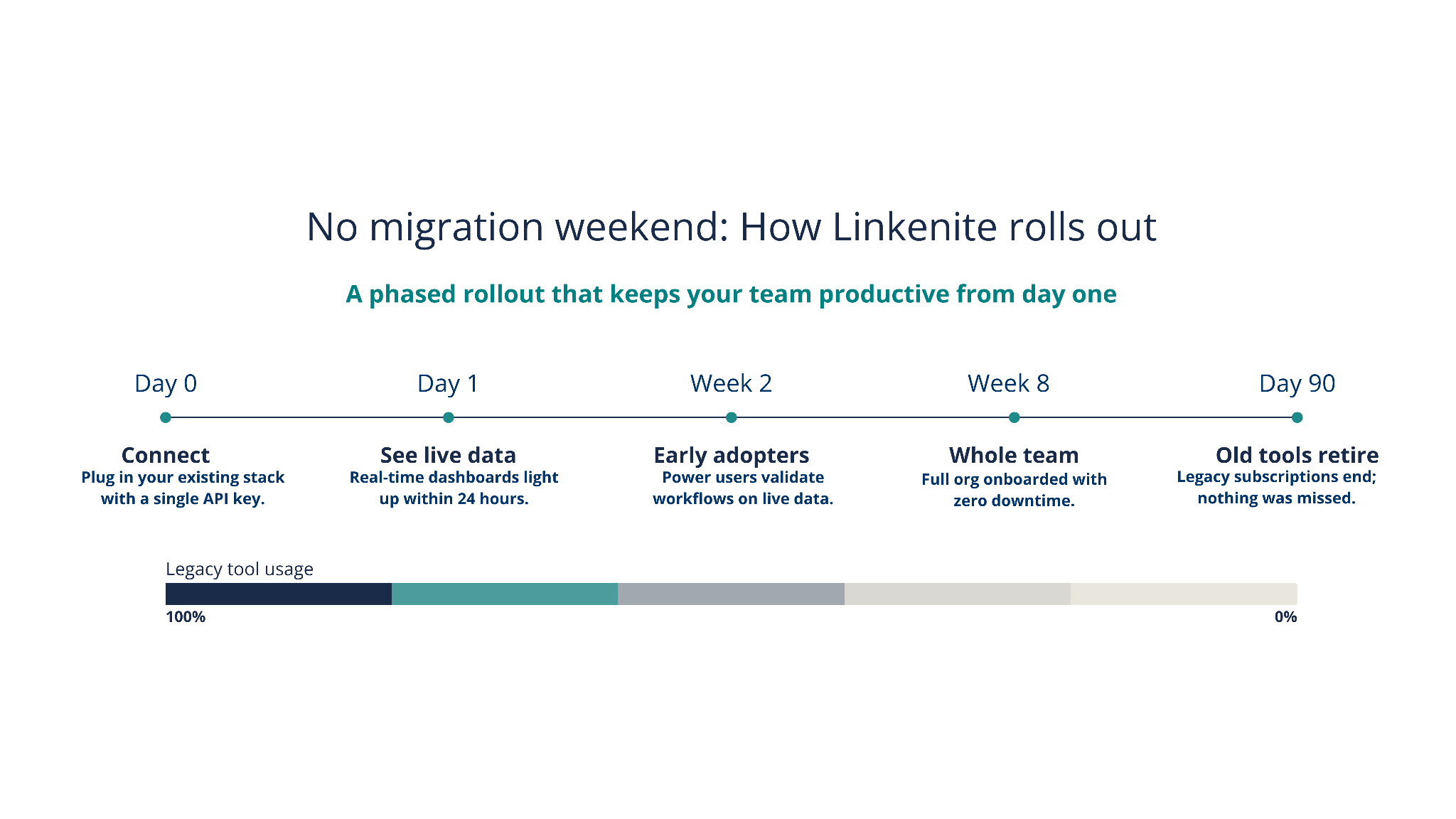
On day one, Linkenite connects to your existing stack through the APIs your tools already speak. Nothing is exported, re-keyed, or moved:
- Your real customers, projects, and pipeline appear in the layer immediately.
- Data flows both ways, so your existing tools stay current too.
- Your email, calendar, and drive stay exactly where they are.
You are looking at your live company on screen before anyone has changed how they work.
Your team adopts at its own pace
Nothing is forced. Nothing is lost.
This is the part that makes it stick. Linkenite doesn't demand that everyone switch on the same Monday:
- The colleague who loves their CRM keeps using it. The engineer who lives in their project tool never leaves it.
- Everyone sees the same truth underneath, no matter which tool they open.
- The two or three people who dislike their current tools move first; the rest carry on unchanged.
Because the layer keeps everything in sync, early adopters and holdouts never fall out of step.
The old tools retire on their own
Not by mandate, by the fact that the new way is simply better.
Adoption compounds quietly over the first weeks:
- Around week two, early adopters are working mostly in the shared view.
- By week eight, it's faster than anything else, and most people have stopped opening the old tools without being asked.
- After about ninety days, you cancel subscriptions, not because you decreed it, but because nobody is using them.
The old stack doesn't get ripped out. It fades out.
Why "no migration" is the whole point
A failed rollout isn't usually a failure of features. It's a failure of the switch, the disruption, the double data entry, the retraining, the holdouts. Linkenite removes the switch entirely, which is why adoption feels less like a project and more like a quiet upgrade that happened while you were working.
You can watch it begin before you commit to anything. Linkenite’s agentic intelligence layer, reserves a private preview and connects to two of your systems read only, so you log in to your own live data, at no cost and with no obligation.
See the rollout start on your own data, reserve your preview and we'll have it waiting.


.png)
.png)
.png)
.png)
.png)
.png)
.png)
.png)
.png)
.png)
.png)
.png)

.png)
.png)
.png)
.png)


.png)
.png)

.png)


.jpg)

.jpg)
.jpg)


.png)


.png)

.png)
.png)
.png)


.png)
%20(2).png)
.png)
.png)




.png)

.png)


.png)


.png)


.png)


%20BLOG%20BANNER.png)


.png)